Inquiry Regarding Toast API Functionality

Dear Toast Support Team,
Hello!
We are currently researching the Toast POS system, and in our anticipated use case, once a customer places an order through Toast POS, our system would retrieve the latest order, parse it, and automatically start production. Based on this expected scenario, I have a few API-related questions that I hope you can help clarify:
- I noticed the API provides an "Add items to a check" endpoint. Could you confirm if this allows adding items to an order after it has already been created?
- If adding items is possible, is there any other endpoint that supports removing or replacing an item within an existing order?
- Once an order is created, is it possible to modify an item’s options? For example, if the customer initially selects “half sugar” and later wishes to change it to “no sugar,” is such a modification supported? Can this be done after payment has been made?
- In our current use of other POS systems, during face-to-face payments, orders and payments are created almost simultaneously. To reduce response time, we usually assume the payment is successful once it’s created and immediately send the order to the production system for processing. Could you confirm if Toast POS also creates the order simultaneously when payment is initiated? Once the order is created, can we assume it is ready to be sent to our system for production?
Since modifying an order after it has been created requires re-parsing and comparing it with the local database, this adds significant complexity to our workflow. Therefore, we would greatly appreciate detailed clarification regarding how order updates are handled.
Please feel free to contact me if any part of my inquiry is unclear. I look forward to your response!
Best regards
-

Hello,
Thank you for your questions. Please see the answers to your questions below in
- I noticed the API provides an "Add items to a check" endpoint. Could you confirm if this allows adding items to an order after it has already been created?
- Yes.
- If adding items is possible, is there any other endpoint that supports removing or replacing an item within an existing order?
- No, this isn’t available.
- Once an order is created, is it possible to modify an item’s options? For example, if the customer initially selects “half sugar” and later wishes to change it to “no sugar,” is such a modification supported? Can this be done after payment has been made?
- No, this can only be done manually on the POS.
- In our current use of other POS systems, during face-to-face payments, orders and payments are created almost simultaneously. To reduce response time, we usually assume the payment is successful once it’s created and immediately send the order to the production system for processing. Could you confirm if Toast POS also creates the order simultaneously when payment is initiated? Once the order is created, can we assume it is ready to be sent to our system for production?
- Anytime an order is created on the POS or Online, it'll appear on the Orders API. To ensure the order is in the
CLOSEDstate and sent to the kitchen, you can see this by looking at the following fields in the Orders JSON via the ordersBulk endpoint or the Orders webhook. - If this is an ASAP order, Toast will update the
closedDatein the Checks object when the balance due is $0 and thepaymentStatusin the Payments object and Checks Object. - In the Orders Object, you can check the
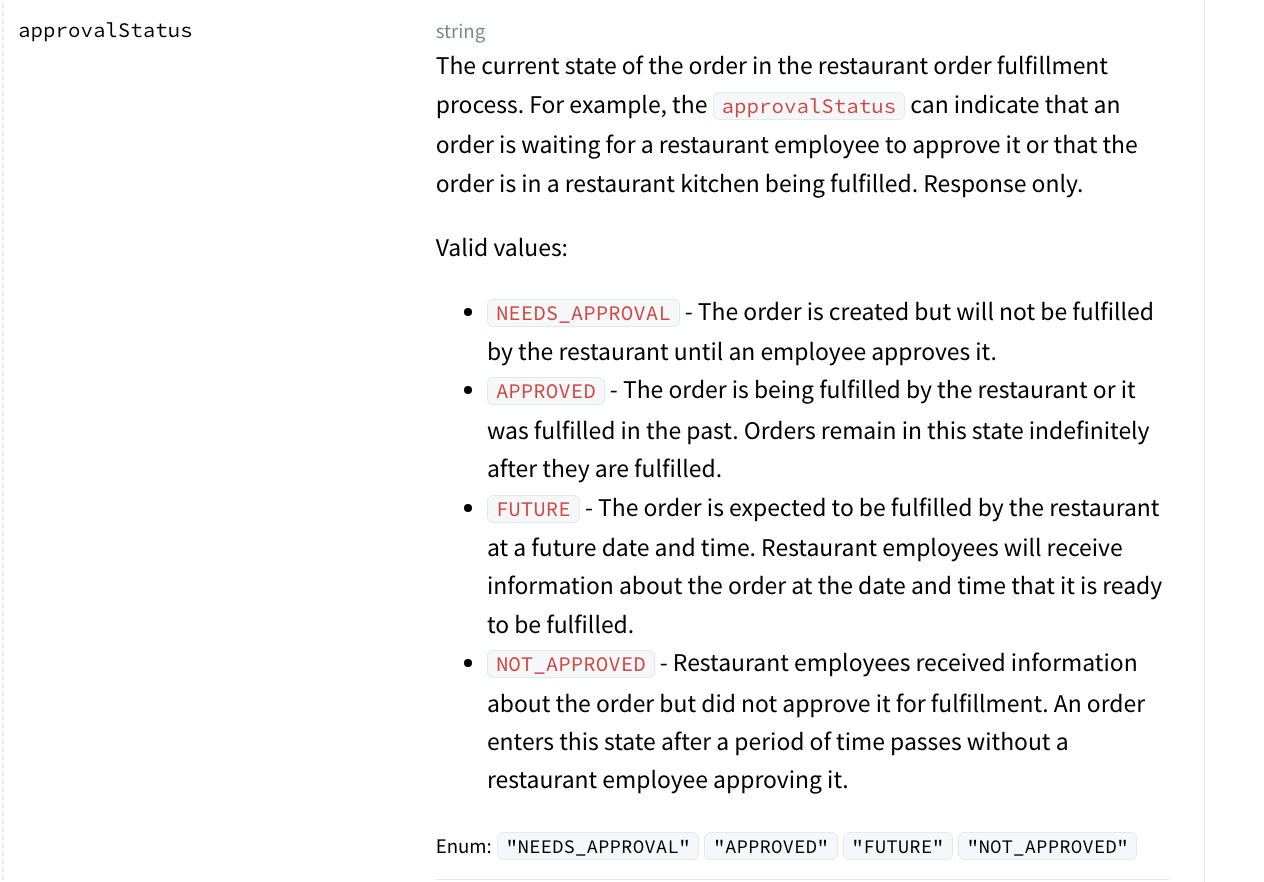
approvalStatusobject which will tell you the current state of the order in the restaurant order fulfillment process. - To see if all the items on the order were fulfilled, you can query the
fulfillmentStatusfield in the Selections object. This will indicate the stage of the preparation workflow that the menu item selection is in.
- Anytime an order is created on the POS or Online, it'll appear on the Orders API. To ensure the order is in the
0 - I noticed the API provides an "Add items to a check" endpoint. Could you confirm if this allows adding items to an order after it has already been created?

Please sign in to leave a comment.
Comments
1 comment