/labor/v1/timeEntries and Tip data
Answered
Hi there,
We are looking at the following keys: declaredCashTips, nonCashTips, cashGratuityServiceCharges and nonCashGratuityServiceCharges from your /labor/v1/timeEntries endpoint.
We are trying to understand what affects our ability to receive these from an API Perspective so that we can suggest process changes or settings changes to our restaurant partners.
- What settings should a toast integraton have in order to ensure that we receive tip data associated with time punches?
- What process does a toast pos user need to follow in order to ensure that we receive tip data associated with time punches? Are there particular processes like Shift Review, Batching CC's etc that we must tell restaurants to do in order for us to receive consistent tip data through this endpoint?
-

Hi Scott,
Sure thing! An explanation about each field:
- declaredCashTips: Tips paid to the employee in cash. Restaurant-facing instructions for declaring cash tips are here.
- nonCashTips: Tips paid to the employee in non-cash tender. Tip pooling often results in nonCashTips values on time entries; more information about tip pooling can be found here. Non-cash tips can also be paid out through payroll, more information here.
- cashGratuityServiceCharges: The amount of gratuity service charges paid in cash to the employee. Service charge creation involves specifying whether a given service charge is gratuity or not, and this JSON value includes cash earned through gratuity service charges. More advanced info about service charges is here. The cash vs non-cash distinction in the API is determined by how the guest paid for the order.
- nonCashGratuityServiceCharges: The amount of gratuity service charges paid to the employee in non-cash tender (such as credit cards).
This page may also be useful to you; it describes the difference between service charges and tips.
We'll provide more info in the next few days in regards to your second question about tip data.
0 -
Hi Liz,
Thank you for the quick response and explanation for each field. We will go through that. Our second question about what processes our users need to follow in order for us to receive full tip data is of the utmost importance to the success of our work. Look forward to your answer on that so we can communicate to our Toast users what processes they will have to go through. Thank you!
0 -
Hi Scott,
To answer your second question about the workflow that is required for the tip and gratuity values to be populated:
Cash tips and gratuity become associated with a time entry if an employee declares this information when they clock out. Non-cash tips and gratuities become associated with a time entry based on the employee's orders that are closed at the time the employee clocks out. Restaurants can configure whether or not they require employees to close open orders and declare cash tips before clocking out. More information in the "Shift Review / Closeout" section of this admin documentation.
0 -
Hi Liz,
Thank you so much for your prompt response. I am doing my best to understand, we tried to schedule a call but it might be time before that happens. Some follow up questions for clarification as we want to approach our customers with confidence about the various settings they need in order to best interface with our product and feature:
- In order to have declaredCashTips / cashGratuityServiceCharges come through, we must make Shift Review `required` and not optional? If this is optional, then we would have to depend on every employee to declare these on clock-out which they may or may not?
- In order to have nonCashTips / nonCashGratuityServiceCharges come through for a time punch, we need to ensure that all of the employees orders are closed before they clock out? It seems like if we set Shift Review to `required` this would happen automatically, but what happens if Shift Review is 'optional'? The paid receipts do not get associated with a punch?
In this case, when do these receipts close out? How would they come through in the API?
- As far as I can see the only difference between Shift Review required and optional is that required requires the employee to close all receipts to clock out and optional allows them to clock out with if there are paid receipts as well. Is this correct?
- How does "Require Collect and/or Tip Out" play into this? The documentation does not outline how/what this setting is used for
0 - In order to have declaredCashTips / cashGratuityServiceCharges come through, we must make Shift Review `required` and not optional? If this is optional, then we would have to depend on every employee to declare these on clock-out which they may or may not?
-
Hi Scott,
Answers to your questions are below! If you'd like to chat on the phone about it, submit a ticket through the portal and we can find a time. Shoutout to our labor product manager Sean, who provided a lot of the information below.
Thanks!
---
-
Shift review: The best way to ensure that restaurant employees consistently declare cash tips is to require shift review. For this reason, we recommend restaurants set shift reviews as required in UI Options to force this workflow, rather than keeping it elective for each employee for the purpose of consistently getting cash tips declared. Cash gratuities are automatically tracked against each employee whenever a service charge (owned by the server) is paid through cash tender. Shift review is also required for cash gratuity to be populated.
-
Closing orders: All orders must be closed in order for an employee to complete a shift review. Orders are not closed automatically based on shift reviews being required. The first step of shift review requires the employee to review all their orders and close them if any of them are still in open or paid states. Therefore, closing orders is not an automatic process, it is a manual process completed by the employee during their shift review.
If orders are not closed when the day ends, orders that are still unpaid remain open and the balance due is reported as “unpaid balance” in Toast’s sales reports. Orders that are paid but not closed are closed automatically by the system at the end of the day with a $0 tip attached. This is the only instance of when orders are automatically closed by the system.
If shift reviews are required, then we have greater confidence that all orders will be closed. If shift reviews are optional, there is a greater chance of employees not completing shift reviews. This means there is a greater chance that not all orders are explicitly closed by the employees.
Requiring shift reviews does not mean 100% of orders will be attached to shifts. An employee who forgets to clock out will not have a shift review completed as the shift review workflow is presented to the employee when they attempt to clock out. If an employee walks out of the restaurant without clocking out, then they will never see the shift review workflow, even if shift reviews are required. Additionally, salaried employees are not required to clock in. So, even salaried they have orders, not having clocked in, they won’t have to clock out, and the shift review is presented when someone attempts to clock out. A salaried employee must clock in first in order to conduct a shift review
-
Clocking out: You are correct that the key reason to require shift review is that it requires employees to close their orders when they clock out.
One other relevant detail about shift review: When an employee clocks in, they do so under a job. The job can be a tipped job or an untipped job. When shift review is required, all employees clocked in under a tipped job will be required to conduct a shift review regardless of whether they have orders or not. An employee clocked in under a untipped job will not be forced to do a shift review if they don’t own any orders, but will be required to do a shift review if they do own orders.
- Require Collect and/or Tip Out: "Require Collect and/or Tip Out" does not factor into shift review processes. We will report the different earning entities in the labor API no matter how this setting is configured. We do not indicate whether the employee was paid out end of night or through payroll. It’s a question of was someone paid out their non-cash tips / gratuities at the end of the night or later when it’s payday. If you're interested in understanding more about that setting, see this documentation.
Let us know if you have additional questions!
0 -
Shift review: The best way to ensure that restaurant employees consistently declare cash tips is to require shift review. For this reason, we recommend restaurants set shift reviews as required in UI Options to force this workflow, rather than keeping it elective for each employee for the purpose of consistently getting cash tips declared. Cash gratuities are automatically tracked against each employee whenever a service charge (owned by the server) is paid through cash tender. Shift review is also required for cash gratuity to be populated.
-
Thank you so much for your insights Liz. This will be very helpful in our integration with Toast
0 -

Hi Liz,
I have another follow up question related to tips. We are trying to verify if we have the correct tip totals that match Toast reports. We are running into a few instances where an employees nonCashTips on their time entry are greater than the sum of all their tips on the Payments Report. Is that expected or should the nonCashTips always match the Payment tips? Do you know what scenario would result in them not matching?
Thanks,
Mike0 -
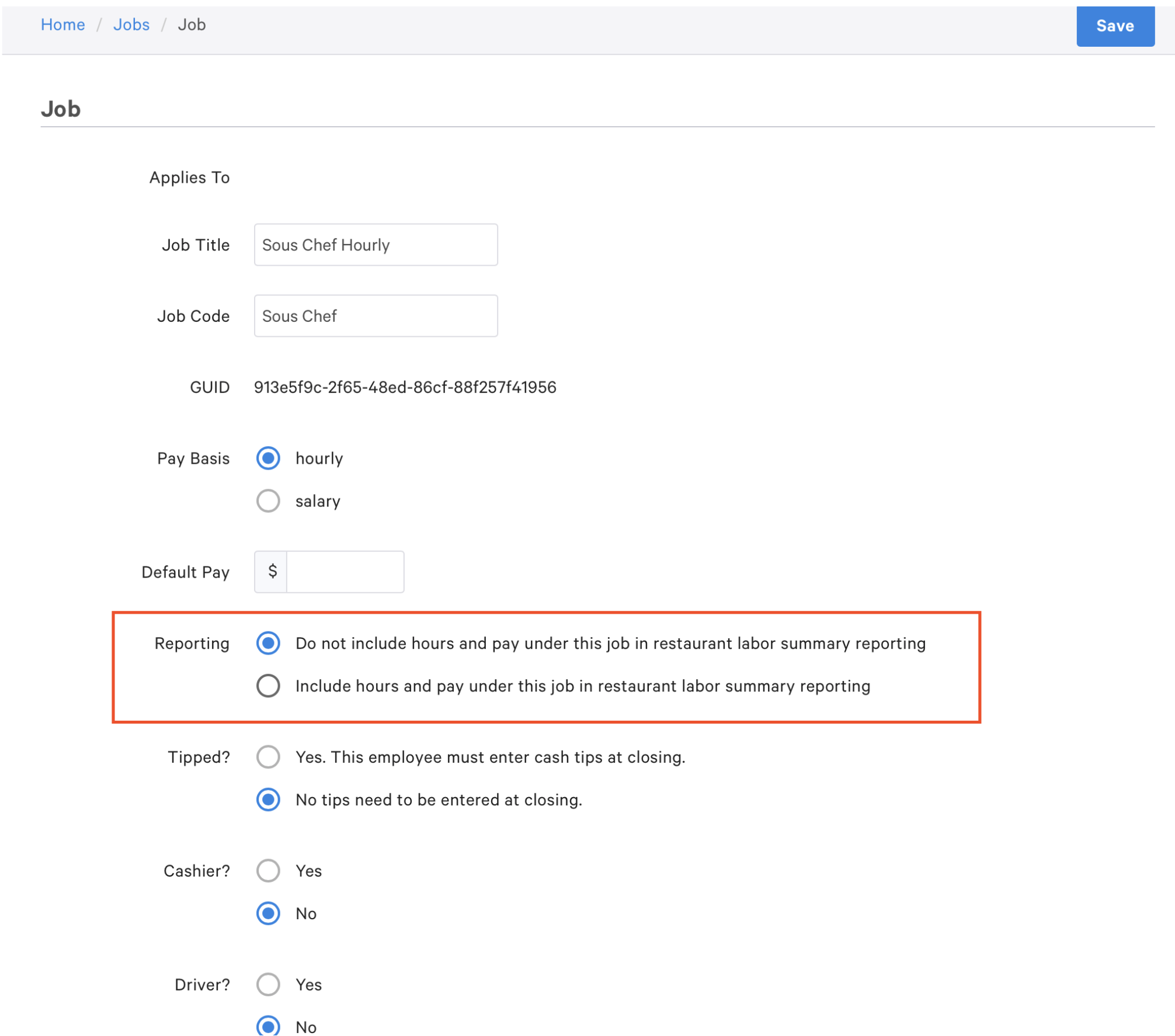
It's tough to know 100% without seeing the specifics, but I wouldn't be surprised if the setting in this screenshot is coming into play. There is a setting on jobs that suppresses hours and pay from reports if a user is clocked in under that job.
 0
0 -
Would that setting suppress payments from the payments report? Liz Jackson could I email you a specific example from a client?
Thanks, Mike0 -
Mike Loubardeas absolutely! I can actually make a ticket between us that's linked to this post, which I'll do now.
0 -
Liz Jackson I have another question regarding tips. I see that total tipsWithheld is available on each employees time entry. Is there a way to get tipsWithheld for each sales receipt?
0 -
Hi Mike Loubardeas,
Tip withholding information is not directly listed on orders/sales, but you can calculate it using the tip withholding endpoint of our configuration API. Hope this helps!
0 -
Liz Jackson Thanks, understood that we would call the tip withholding endpoint for the %withheld and then apply that to any payments with payment type = 'credit'.
Follow up question, does Toast have the ability to withhold tips from any of the other payment types? A client is asking us to withhold tips from online orders, which show under the 'other' payment type, and gift cards.0 -
Thanks for your patience Mike Loubardeas! Tip withholding only applies to credit card tip because the functionality is intended to compensate for credit card processing fees.
Do you know why the client is asking you to add tipwithholding to other payment types such as gift cards?
More info about tip withholding in general can be found here.
Thanks!
0
Please sign in to leave a comment.
Comments
14 comments