Loyalty API make the itemGroup in Selection a list
Not planned
Interesting problem I'm having and it's possible that there's a way to do what I want that's not obvious to me. What I'm trying to do is find out what category (categories) a menu item is part of. One use case is a customer has a loyalty program but they don't want to discount alcohol because that's illegal. So I need to know what items are alcohol. So I think the itemGroup in the selection tells me the category of an item. However, it also seems that menuGroups can be nested. For example:
{
    name": "Beers",
    "guid": "3b11f264-23de-4dc2-9694-804324f1e2f1",
    "masterId": 400000006810720791,
    "menuGroups": {
        .
        .
        name": "Domestic Beer",
        "guid": "3b11f264-23de-4dc2-9694-804324f1e2f2",
        "masterId": 400000006810720795,
        "menuGroups": [{
            menuItems: [
                {
                    name: "Bud Light",
                    guid: A...,
                    masterId: B...,
                },
                ...
            ]
        }]
    }
}
So here we have a Beers menuGroup, and it contains a menuGroup for Domestic Beer. Our software is configured to exclude anything in the Beers menuGroup. However, when I order a Bud Light in the check I get from Toast the itemGroup says that the Bud Light is a Domestic Beer not a Beers.
It looks like Bud Light can also be part of the Beers menuGroup and if that's true the itemGroup that gets populated in the Selection changes depending on how you order it. I think what I'd like is for the itemGroup on Selection to be a list of all the menuGroups the item is a member of (and all their parent menuGroups). Then I could tell that Bud Light is a Domestic Beer and also a Beers.
Am I right that menuGroups are the way Toast categorizes items or is there a better way to find the information that I need?
-

Hi Jonathan,
You are correct that a menu group can be nested within a menu group. Nested menu groups are called subgroups, and more information about subgroup creation can be found here.
I followed up internally to see if there is a standardized way of recognizing alcohol. Currently there is not; it is a restaurant-specific implementation decision, though you have the right idea that placing alcoholic beverages in a menu group is by far the most common way to segregate alcohol from other items. In terms of knowing what is alcohol and what is not, there are two approaches that come to mind:
- Use menu groups (and subgroups, in some restaurants' setup) to contain alcoholic beverages
- Use item tags to tag alcoholic menu items
That said, approach #1 is what you'll find at most places.
Are you able to save the mapping from subgroups to overarching parent group within your system? In other words, say there's a menu group called "Wine", with subgroups of "Red Wine" and "White Wine". Are you able to maintain a mapping of the "Red Wine" and "White Wine" subgroups to the overarching "Wine" menu group, so that you know that items from these two subgroups are alcohol due to their inclusion in the "Wine" parent group?
0 -
Yeah, that's what we're working on doing. We can use the menu API to find all the menu groups and subgroups and maintain a hierarchy. Then when we get the check from the loyalty API we append all the parent groups. So maybe you have Alcohol menu group, a Wine subgroup and then a Red Wine subgroup below that (it doesn't look like this is possible to setup but the API supports unlimited nesting) and we get a menu item in the Red Wine subgroup we can look up the menu hierarchy and say that this item is a member of the Alcohol, Wine and Red Wine "categories" for lack of a better term.
I don't have a customer example of this but I could imagine someone setting up a Beverage menu group with a Wine subgroup. From our testing it looks like itemGroup we receive changes depending on how the item was ordered. So if they a wine off the Beverage menu group screen we'd get a menu group of Beverage whereas if they ordered it from the Wine screen we'd get a menu group of Wine. To support this we'd have to look to see what menu groups or submenu groups that item is a member of and whether ANY of them are excluded.
0 -
How does Toast handle this? If I wanted to setup a $2 off a Bagel discount in Toast how does Toast know what a Bagel is? I looked through https://central.toasttab.com/s/article/Basic-Discount-Configuration but it's not clear to me how you'd configure this.
0 -
I'm interested in digging deeper into the workflow in which there's "Red Wine" and "White Wine" under "Beverages" and the guest is able to order a pinot noir off of "Beverages" rather than ordering it off of "Red Wine". I tested this in sandbox and was only able to order items from subgroup when I went into the subgroup itself, if the item is strictly in the subgroup.
I suppose a restaurant could put the pinot noir item in the "Beverages" group and "Red Wines" group separately and redundantly. This would be technically possible, though an odd implementation. A menu item can only be ordered from its immediate parent group, which may be a first-level group or a subgroup.
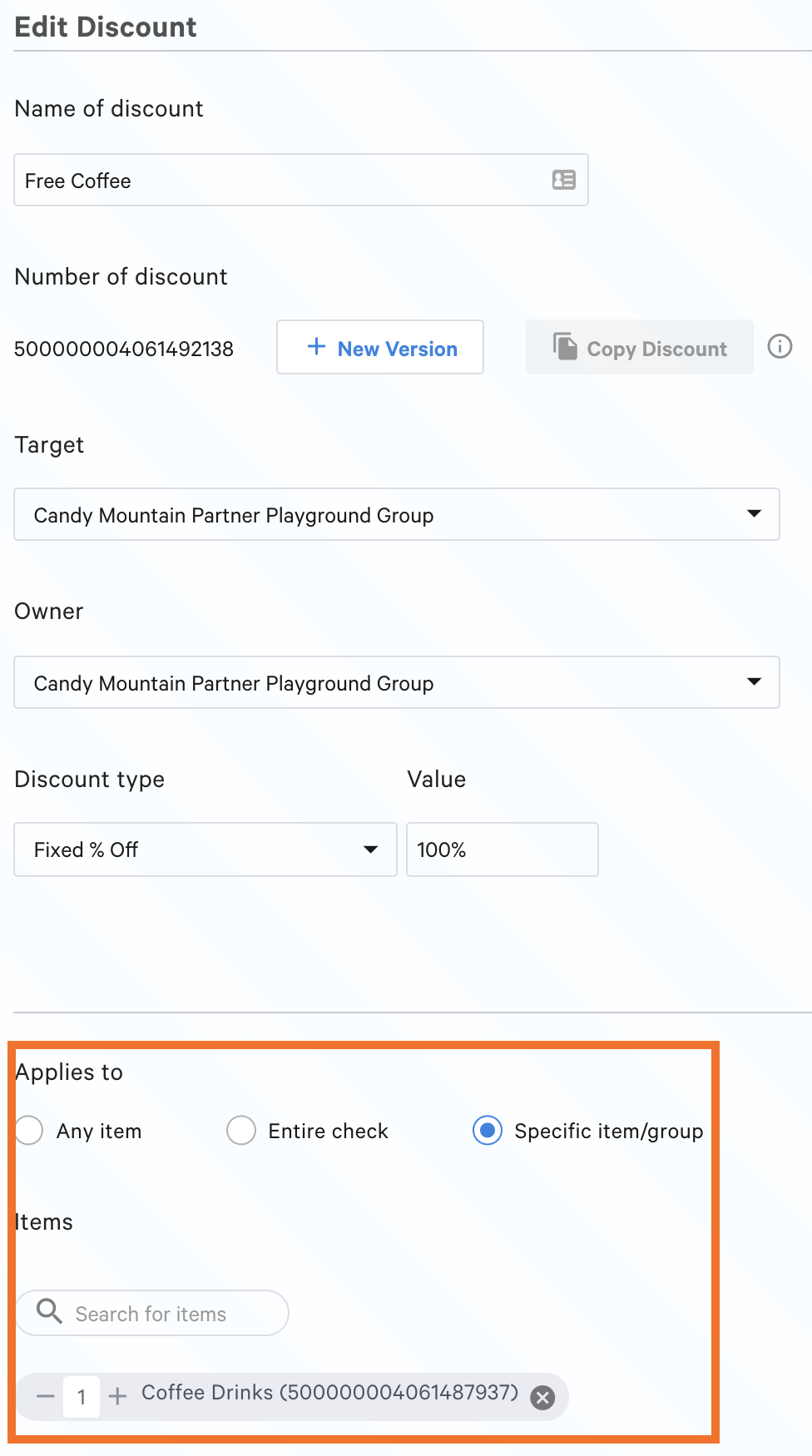
In terms of designating a discount for a specific item, the discount edit UI allows admins to select items or groups that a discount applies to. Example in screenshot below!
---
To address the more general question about converting the itemGroup JSON value into a list, I don't expect that we will make this sort of modification in the foreseeable future, partially because it would be a pretty disruptive change in order JSON structure from a backwards compatibility standpoint. That said, we hear your concern about making it easier for you to know when an item selection includes alcohol vs when it does not. I'll pass this full thread to our product team for awareness, and we'll keep you posted if there are updates about alcohol tagging in the future.
0
Please sign in to leave a comment.
Comments
4 comments