Field addition proposal

Hi. I'm currently using Toast Webhook API. It is a great API, but I have a few pain points that would be trivial for you to resolve.
- Table Name Mapping: I wish there could be `table.name` in the webhook message body. Currently, it only has the UUID-like string. It is technically more correct, but it is hard to manage mappings between those IDs to human-friendly table name. There's already table name in the UI, so it shouldn't be hard technically.
- Order ready trigger: Can the webhook also be triggered when order is ready? It would be great when we can receive webhook when `order.status = ORDER_READY`.
-

Hi Jaehyun,
Thanks for the feedback; these are helpful suggestions! I'll pass both along to our team for review.
On the table name mapping, that's not on our near-term roadmap, but I'll make sure the feedback is noted.
On the order ready webhook, we do have a guest order fulfillment status webhook, but it's only available to channel partners, partners who submit orders directly into Toast, and you would only receive notifications for orders your integration submitted.
As a workaround, the best option at the moment is to loop through each item in the Selections object via the orders webhook and check the
fulfillmentStatusfield. The relevant statuses are: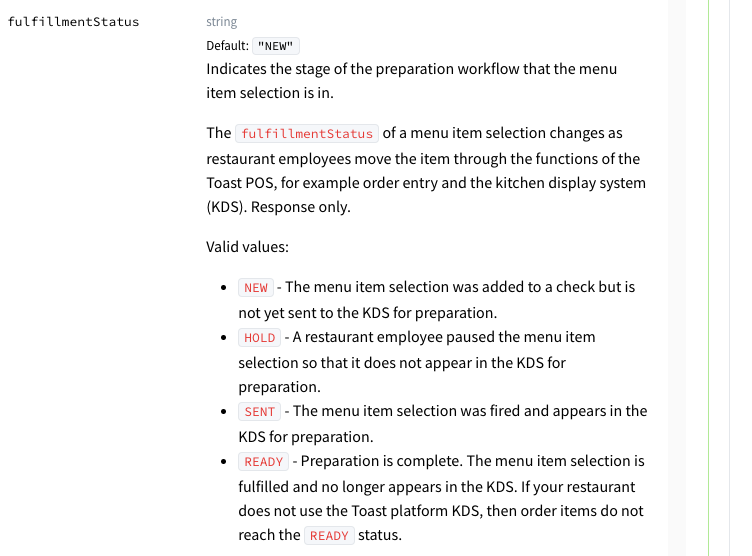
Best,
John
0 -

Hello John,
Thank you so much for your suggestion. However, I've conducted several tests, and it seems this field does not behave as expected. I've recorded a screen capture of one of these tests to better illustrate what is happening.
[Link] As you can see in the video:I'm using ngrok to intercept the webhook events locally while making changes to the order directly on a POS virtual device.
Even after the order is marked as "Order Ready" and subsequently "Complete" on the Toast POS, the webhook payload consistently returns
fulfillmentStatus: “SENT”.
I manually checked each event received in the logs (as shown in the recording), searching for the status change you suggested, but it remained "SENT" in every single payload.
Since none of the events transitioned to the "READY" status during my tests, could you confirm if there is a specific POS configuration required for this field to update?
We would appreciate any further guidance or assistance on this matter.
Best,
Benhur Külzer0 -
Thanks, Benhur, the video was really helpful in looking into this issue.
The fulfillmentStatus field does not get updated when an order is marked as Complete through the Orders Hub. To get the fulfillmentStatus field updated, you need to mark the order as fulfilled on the Kitchen Display System (KDS). More info here on using the KDS to fulfill orders.
If you're still running into issues after trying this, please create a ticket here: https://tost.co/general-api-support and we can take a closer look. You can also use that form to request the KDS module to be enabled at your Sandbox test location if needed.
Thanks again for flagging this! We'll work on updating our documentation and passing the feedback along to our product and engineering teams.
Best,
John0
Please sign in to leave a comment.
Comments
3 comments