Additional Tip text is confusing

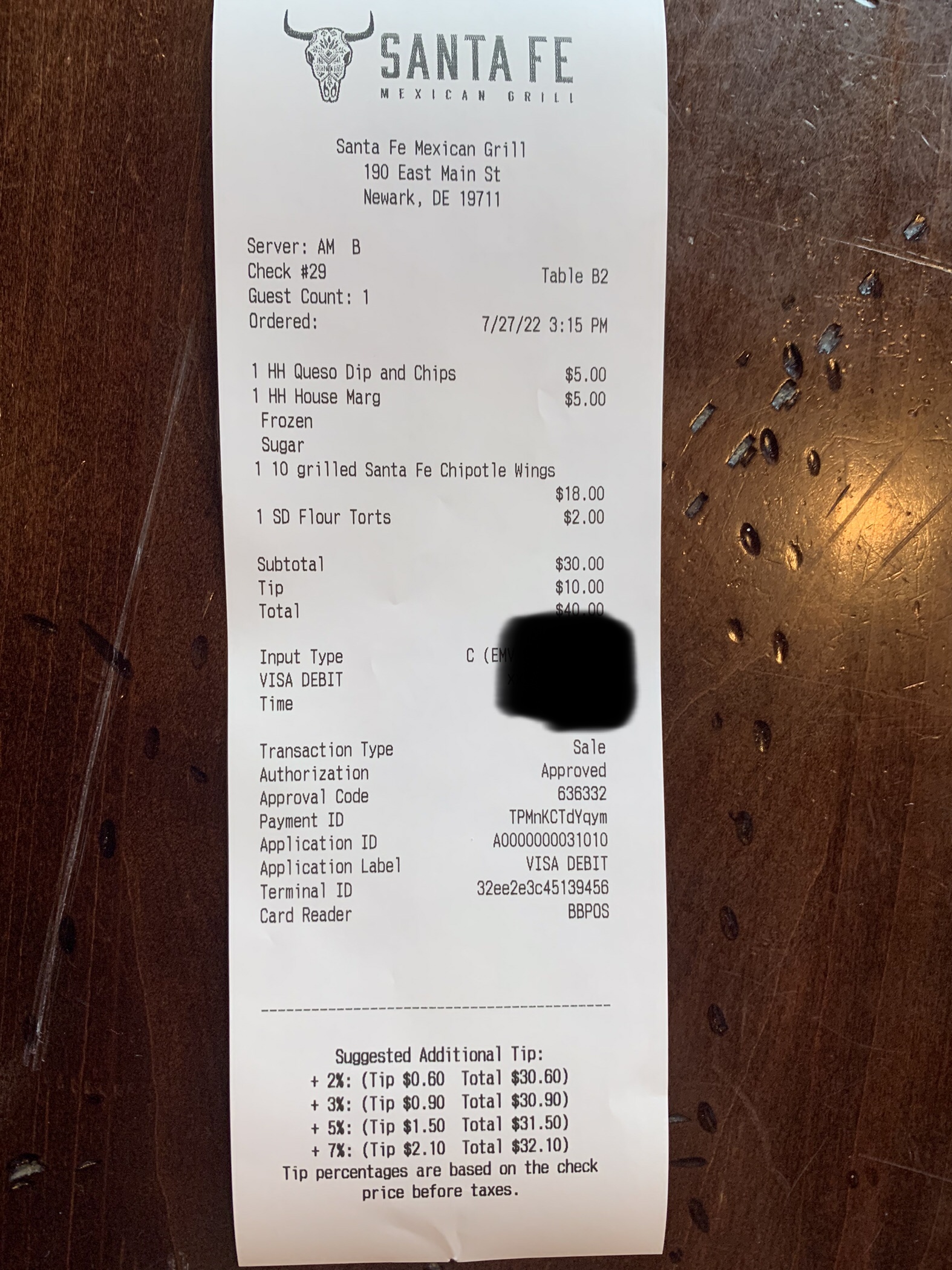
The guest credit card receipt has text at the end about additional tip, but the math doesn't work out correctly when they already tipped. (See pic). I would like to remove that text... How can I do so?
Thank you!
Patience
-

Hi Patience snell,
Your image did not come through on your post. Are you referring to the "Suggest Tip" section? This Toast Central article outline the various receipt configurations that are available:
https://central.toasttab.com/s/article/Customizing-Receipts-Advanced-Configuration
Thanks!
0 -
Hi Ann
Attached the image again here.
Per the article you attached, I have "tip" but not "additional tip" selected. Still the additional options appear.
Looking forward to your advice.
Patience
 0
0 -
Hi Patience snell,
In Toast Web under Payments --> Checks & receipt setup --> Guest receipt setup near the bottom of that page there is an option for "Display Tip Percentages on Customer Receipts." You can toggle this off and customize the tip percentages if you follow the "UI Options" link:
 0
0
Please sign in to leave a comment.
Comments
3 comments